Desertcart purchases this item on your behalf and handles shipping, customs, and support to Aruba.
๐ฏ Master your workspaceโanywhere, anytime, effortlessly.
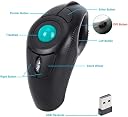
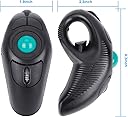
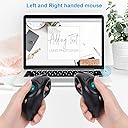
The welspo Wireless USB Handheld Finger Trackball Mouse offers a compact, ergonomic design ideal for professionals on the move. Featuring a 10-meter wireless range, plug-and-play USB connectivity, and a precision thumb-controlled trackball, it supports both left- and right-handed users while reducing wrist strain. With 5 customizable buttons and an integrated laser pointer, itโs perfect for multitasking and presentations, making it a versatile tool for modern workspaces.


| ASIN | B0057KL2AU |
| Additional Features | Wireless, handheld, trackball mouse |
| Antenna Location | Office |
| Best Sellers Rank | #282 in Computer Mice |
| Brand | welspo |
| Button Quantity | 5 |
| Color | green ball |
| Compatible Devices | Laptop, Personal Computer |
| Connectivity Technology | USB, Wireless |
| Customer Reviews | 3.7 out of 5 stars 2,348 Reviews |
| Embellishment Feature | LED |
| Enclosure Material | Plastic |
| Hand Orientation | Ambidextrous |
| Hardware Platform | Laptop, Tablet |
| Included Components | 1 x wireless finger handheld USB trackball mouse with laser pointer, 1 x USB receiver, 1 x bag |
| Item Dimensions L x W | 4.3"L x 1.9"W |
| Item Type Name | Finger Trackball Mouse |
| Manufacturer | BrainyTrade |
| Mfr Part Number | 3800012 |
| Model Name | Finger Trackball Mouse |
| Model Number | brf6 |
| Movement Detection | Trackball |
| Movement Detection Technology | Trackball |
| Number of Batteries | 1 AAA batteries required. |
| Number of Buttons | 5 |
| Operating System | Linux, Unix, Windows XP |
| Power Source | Battery Powered |
| Range | 10.0 meters |
| Special Feature | Wireless, handheld, trackball mouse |
| Style Name | Modern |
| Theme | Modern |
| UPC | 847977003401 702248181960 |
| Unit Count | 1 Count |
| Warranty Description | 1 year |
C**R
Ergonomic ambidextrous and fantastic for navigating without a desk
I have on older, wired version of this trackball and liked it for navigating the shop computer without reaching awkwardly to the touchpad on the keyboard. The cord was still more limiting than the keyboard which is wireles so I was looking at wireless trackballs and found the very one, except wireless. The "handle" end is much easier to hold than the wired one and the added controls top it off. I'm a fan! Update: I Really like this trackball. I use it for navigating browser and YouTube in my shop. It does take a little practice and I saw some say it locked up but I have found that pressing the left mouse button (which is the right thumb button) brings back function (like it was waiting for input or something). The battery cover is weak and I have had the ball fall out from dropping the unit but I like it so much that I bought a second one to keep as a backup. The DPI switch is a new thing for me and I find it useful because I use two monitors and I can keep it set to move quickly between them and slow it down in cases like selecting text etc.. Update 2: I have come to depend on this trackball and it saves me so much effort navigating multiple browser instances. One note: I have had to remove and re-insert the receiver (dongle) a few times to reset it after software updates but it recovers when reset. Also, the battery life is not great but not terrible (over a month usually) because it is a AAA single cell. I do keep a piece of electrical tape over the battery lid because it is too easy to remove and will fall out if dropped. I would definitely buy this again and am considering getting one for my laptop.
V**R
Nice alternative to trackpoint/touchpad
I use a laptop that has a touchpad (which I hate), and also has a trackpoint (the "eraser" thing) which can be fatiguing and painful if I'm doing a lot of mousing. When I'm working at a desk, I can use a regular mouse. But when I'm working elsewhere, a mouse doesn't work well at all. I hate a true trackball - tried them many times and they just never work well for me. This concept looked intriguing so I decided to give it a try. First off, my comments would apply to any of a number of models of handheld mouse out there. The concept is interesting - you hold the mouse in your hand, don't have to be right by the machine, don't have to have room for a mouse to move. After several days of using it, my thoughts are: - It's a bit disrupting to have to put the mouse down when you have to use the keyboard. So for someone doing a lot of keyboarding, with the occasional mouse click, this isn't the best choice. It's usable, just a bit intrusive. - The thumb-sized trackball is better than a full-sized trackball for precision, but still can be tougher to get the pointer in just the right spot. I wish there were a version that had a little thumb-sized touchpad (or better yet, a trackpoint!). - The two buttons which serve for "right-clicking" are below the trackball, on either side of the scroll wheel. It requires a bit of thought when you need to right-click. Presumably that will become more automatic with a bit more practice. - The laser pointer would be useful if you were doing a presentation. It's controlled by the left-hand of the two buttons above the trackball. The righthand button does nothing in this model. Other versions of this device have those buttons working for page-up/down scrolling and double-clicking. The laser pointer is fun (sure wish I had a cat to tease with it) but for me, not terribly useful. Another version (no laser pointer/paintbrush) would have been a better choice for me. Durability: can't really comment as I've just had it a few days. The thing does seem to be holding up well, charge-wise, since its initial charge the day I got it. The documentation is useless. There's a diagram showing the various buttons and what they mean for the different versions, but no instructions. Fortunately it was pretty self-explanatory - I just plugged in the little wireless USB thingy to install the drivers, then plugged in the separate USB cable and let it charge.
M**I
spend the extra money and save yourself a headache
Do yourself a favor and spend the extra $30 on the other trackball mouse that comes up in search; this one disconnects after two minutes of idle time, and the only way to reconnect it is to unplug the USB from the PC and plug it back in. Thatโs a major flaw, especially since I bought it to use while walking on a treadmill and controlling my PC. The only cool thing about it is the laser, but if I wanted a laser pointer, Iโd just buy a laser pointer.
W**N
riding 'shotgun'.
it's an excellent product to begin with. It simply 'WORKS'. The delivery was much faster than anticipated. I sit back in my recliner connected to wifi and click away. The ball will not fall out of the base as others will do. This simply works in the fashion that it's supposed to with no ill side effects. It comes with a cleaning tool, batteries, and a small sack to keep it in when not in use. I like this tool alot and when I wear it out I will buy another one. Or perhaps get one for the other hand and I'll have 2 six guns on my hip.
V**S
No more shoulder pain, but it doesn't last long
I love this mouse. I just got it yesterday, so I can't say how long it will last. It seems as well constructed as any of the other mice I've ordered in the past couple of months. It was well packaged & came with a function manual in English & Chinese(?). I did have to plug the usb dongle in & take it out a couple of times before my computer recognized it. I received the one that uses battery power & I'm using it with Windows 10 Pro. I am able to switch between my left & right hands with no problems. The track ball moves very easily--I like it that way. The scroll wheel has just the right amount of resistance. The only complaint I can think of is that it is slightly large for my hands, which are medium sized for a woman with slightly short fingers. I am not able to comfortably hold the mouse & use the scroll wheel & the top 2 buttons. I don't need the laser pointer (top left button) at all & I don't know what the top right button is for. It doesn't seem to do anything. The function manual says it's "Enter". I have been trying different types of computer mice--(regular, sideways ergonomic, trackball) & desk & chair configurations to alleviate shoulder pain. This mouse seems to be the answer. I can put my arms in any position to use it with no strain at all. Update 4/29/17: The mouse stopped working a couple days ago. I am very disappointed--it lasted just shy of 5 months. I'm dropping my review from 5 stars to 3. I can't decide if I'll order another or try a different type. For basically $5 a month, it did help my shoulder though. So it might be worth it in the long run.
F**R
Works well as presentation remote
Image Wireless USB Handheld Finger Trackball Mouse with Laser Pointer I have not had this item long or used it extensively, so take this review for what it's worth. Here are what the various buttons do: Trigger is left click. Upper left button is laser pointer. Upper right button is same as pressing Enter key on keyboard. Lower left and right buttons are right click (context menu). Pros: - Nice to be able to have mouse hand free to be in any position, not chained to the desk. After a lot of work using my Kensington Expert Mouse Wireless Trackball I can feel discomfort in my wrist, so it is nice to be able to pick up this mouse and use it for a while; no discomfort. So it is obviously not as hard on the wrist. - Good wireless range. I haven't measured how far, but at least one customer claimed 40 ft. - Soon after purchasing this item I found myself in need of a presentation remote. This trackball mouse worked great. No problem clicking through slides, my computer in the back of the auditorium and me at the front. Cons: - I have essential tremor, that is, my hands shake sometimes. Thus I find that sometimes it is difficult to precisely point the cursor as my thumb is not steady on the trackball. With the Expert Mouse trackball I can more precisely position the cursor. - The trackball is not as firmly held in place as I would like it to be, and thus the thumb needs to be pulled off very carefully; any slight movement in any direction will flick the pointer off target. If it were firmer, requiring a bit more force to roll, I think this issue and the problem I have with essential tremor would be reduced. - Have to set it down to continue typing, which can be a little less convenient than simply moving hand from desktop-bound mouse to keyboard. - No way to change what all buttons do. Using the free X-Mouse Button Control software (use a search engine to find it), you can change the trigger (left click) and bottom two buttons (right click), and how the trackball and scroll wheel behave. But the bottom two buttons don't appear to be independently modifiable; they will always do the same thing; whatever one is programmed to do the other will do it also. Overall I like this mouse and am glad I purchased it.
A**R
Has so much potential to be great... But it isn't.
Let me preface by sharing the following information:. โข I do extensive work on my PC so having a mouse that's comfortable to use is of extreme importance. โข I also obscure away from sitting at a desk as much as possible so having a mouse that is able to be used on a variety of different surfaces (including my own body) is ideal. โข I have owned several different trackball style mice (?) in the past which I have enjoyed for the most part. Considering the above I think it's clear why thie welspo Wireless USB handheld Finger Trackball Mouse with Laser Pointer was an attractive option. On the surface it's a wonderful concept and theoretically seems like it should be highly ergonomic; however, I found this device to be mediocre at best and frankly a bit dangerous which I will elaborate on further down in this review. I believe there are a few design changes that would make this finger trackball mouse a superior choice above similar products in this niche of the mouse world but of course this is just my opinion and may not align with the point of view of others but I digress. First impressions upon unboxing the mouse were that the outer shell is made of very low quality plastic (3D printer maybe) and not only that but the surface is rather slick making it difficult to hold onto. Getting the cover for the battery compartment reinstalled was more difficult than it should have been and frankly why is this powered by batteries anyways? USB C charging port would be a better option and likely free up space internally which could open the door to many other possibilities. Functionally, this thing is great in some aspects but not so great in other. I do enjoy the trigger style button as the left click analog and the trackball is nested in almost the perfect position but that's about where the functionality of the thing ends. Having the laser pointer button and 'whatever the one next to it does' button doesn't work for me. In my mind having the scroll wheel and right click button above the trackball would be a much better layout as I often times found myself squeezing the trigger button while either attempting to click the scroll wheel or either of the two right click buttons below. Speaking of why exactly are there two right click buttons anyways? With a different button layout I think this thing would be great but as it is now I have ahead time using it efficiently. A word of caution: DO NOT DROP THIS DEVICE unless you desire to undergo impromptu laser eye corrective surgery. I accidentally dropped the mouse one the carpeted floor in my office and reached down to grab it without looking. After I retrieve the device I discovered that the trackball had dislodged from its perch. Unfortunately, I made this discovery by looking at the device itself as my thumb brushed over the empty Crater which sent a beam of brilliant blue light straight into my left eye. Yeah I know I should be careful around laser and whatnot but is it farfetched to think that there should be some sort of safety measure in place that prevents the laser from lasing whenever the trackball isn't present? I'm sure I'm not the only person that this will happen to and that laser is fairly powerful. For the next day or two after this incident I had a difficult time seeing things clearly which gave me a wicked migraine. I'm also fairly confident that my overall vision has degraded since that event as well as there is a faint blue cloak over everything I look at..... I had high hopes for this mouse but it just doesn't do it for me. Too many poor design choices to be ergonomic or useful for a person who uses their PC heavily. Plus it's potentially hazardous to your eyesight.... With some major changes I'm sure this mouse could be the next big thing though
A**G
User friendly!
Itโs awesome. Prefect for my bent fingers.
E**N
Read comment
Very sensetive even after reducing sence settings. Material is weak, not durable
C**Y
Exactly the mouse I needed
I have a rather unorthodox computer setup so I needed a rather unorthodox mouse to do my computing. Prior to this mouse I used a normal trackball style but for someone whom their computer is their TV and needs their mouse to work sort of like a remote or to work for me when walking around versus having to sit down with any normal kind of mouse I was curious about this style of mouse. When my old mouse broke after many years of service I thought this was now the time to try this out. I have had this mouse now for almost a week so while I cannot speak to its battery consumption and overall toughness as that would take months to take into consideration I am happy with this purchase for the week I have had to use it under multiple day to day scenarios. The style works perfectly for me and makes my computing easier if I want to stand up and use the mouse versus always having to sit down or have the mouse on my knee to properly move it. Eases the stress on my wrists as well which is an added bonus. I heard there was some slight issues with using this mouse with iOS however I have not come across that yet, it seems to work well with my Apple computer. Only issue I have which is a slight nitpick is that I would have put the right click button in a different place, I would have made one of the top two buttons above the track ball the right click button but it is a barely minor inconvenience. Either way I am satisfied with this mouse.
M**G
Cheap and nasty
buy a known brand
M**M
ู ุงูุณ
ูู ูุนุฌุจูู ูุงูู ูุง ููุฌุฏ ุจู ููุฒุฑ ูู ุง ูู ู ุฐููุฑ ูู ุง ุงูู ูุง ูุณุชุญู ุซู ูู ูู ุงูุงุฒุฑุงุฑ ุชุนู ู ุจููุณ ุงููุถุน ุงูุง ู ุณุชุงุกุฉ ู ู ุงูู ูุชุฌ
J**A
Useless as a mouse. Trackball is loose
Trackball is very loose which makes it incredibly inaccurate for using this as a proper mouse and clicking/selecting objects in the computer. The simple fact of slightly moving your hand or pressing the โclickโ button itself makes the trackball move and the pointer too (making you click on something else) Perhaps an ok product for powerpoint presentations but definitely a waste of money and completely unusable as a mouse. Iโve put a little mark on the trackball for my video so people can see how much the ball moves loosely without input, so people understand what I mean
Trustpilot
2 weeks ago
4 days ago